Personalized Morning Newspaper: Your Whole Day on One Printed Page
The first thing most of us do each morning is open the inbox, and the day gets away from us. A personalized morning newspaper puts your meetings, key messages and news on one calm page.
 AivoPass Editorial TeamReviewed by our agent setup specialists
Updated
Reading time4 min

A personalized morning newspaper is a one-page daily summary of your own day. Personal Morning Paper reads your calendar and key emails, adds news you care about and lays it all out like a real newspaper, ready to print or read on screen every morning. It reads only; you decide what to reply to.
Most mornings start the same way: phone in hand, inbox open, a quick look at the calendar, then a news app, then back to the inbox. Twenty minutes later you have seen everything and planned nothing. A personalized morning newspaper replaces that screen hopping with one page that tells you what your day holds.
This guide shows how to design a calmer morning routine, what belongs on a one-page daily paper and how Personal Morning Paper builds it from your email and calendar overnight.
See Personal Morning Paper Done-for-you setup · You approve every action
What is a personalized morning newspaper?
A personalized morning newspaper is a daily one-page summary of your own day, designed like a traditional paper. It combines today’s meetings, the few emails that need attention and a short selection of news, so you can understand your day in a couple of minutes, on paper or on screen.
What Personal Morning Paper does
- Your calendar and key emails: today’s meetings plus the messages that truly need you.
- A beautiful newspaper layout: headline, columns and clear sections.
- Ready to print or read on screen: a PDF that looks good either way.
- Delivered every morning: waiting before you wake up.
Before and after
| Morning task | Without the paper | With Personal Morning Paper |
|---|---|---|
| Checking meetings | Calendar app, maybe two | Front-page schedule |
| Finding urgent emails | Scrolling the inbox | A short “needs you” list |
| Catching up on news | Feeds and alerts | A few chosen stories |
| Time spent | Twenty minutes or more | A few calm minutes |
| How the day starts | Reactive | Planned |

How to design a calm morning routine
- Keep the phone away for the first half hour. Let the paper be your first look at the day.
- Read the schedule first. Know your fixed points before anything else.
- Scan “needs you” items. Circle the two or three that matter today.
- Read the news last. It is useful, but it is not your day.
- Write your top three. Use the margin of a printed page to decide your priorities.
What belongs on one page
A good daily paper is ruthless about space. The front section shows today’s meetings with times, locations or video links and who you are meeting. Next comes a short list of emails that need a decision, each summarised in a line. A small weather and commute box helps on snowy Ottawa mornings. The last column holds a handful of news stories on topics you chose, from local business news to your industry. Everything else waits for the inbox.
Who it is for
Executives
A CEO in Toronto reads her printed paper with coffee before the first call at 8:30 a.m. Eastern. She arrives at the office already knowing which three conversations matter most.
Consultants and professionals
A consultant in Vancouver works with clients across time zones. His paper shows meetings in Pacific time with a note when a client is three hours ahead, so nothing catches him off guard.
Families
A family in Montreal receives a bilingual edition with school events, appointments and a short note about the weather, printed on the kitchen printer every morning.
Results to expect
These figures are typical estimates, not guarantees. Results depend on how busy your inbox and calendar are and how you use the page.
Over time, the paper also becomes a quiet record of your weeks. Many people keep the printed pages in a folder and glance back at them on Friday to see where their time really went.
Mistakes to avoid
- Putting everything on the page. If it does not fit on one page, it is not a summary.
- Reading the inbox anyway. Trust the “needs you” list for the first hour.
- Too many news topics. Three or four topics are plenty.
- Never adjusting. Review the sections after the first two weeks.
Safety and control
- Read-only access to email and calendar.
- It never sends, deletes, accepts or declines anything.
- You choose which senders and calendars are included.
- Your paper is delivered only to you.
- Access can be removed at any time.
Personal Morning Paper vs alternatives
| Option | Your meetings and emails | News you choose | Screen time |
|---|---|---|---|
| Checking the inbox | Emails only, unsorted | No | High |
| Calendar app | Meetings only | No | Medium |
| News apps | No | Yes, plus noise | High |
| Personal Morning Paper | Yes, summarised | Yes | Low: one page |
How setup works
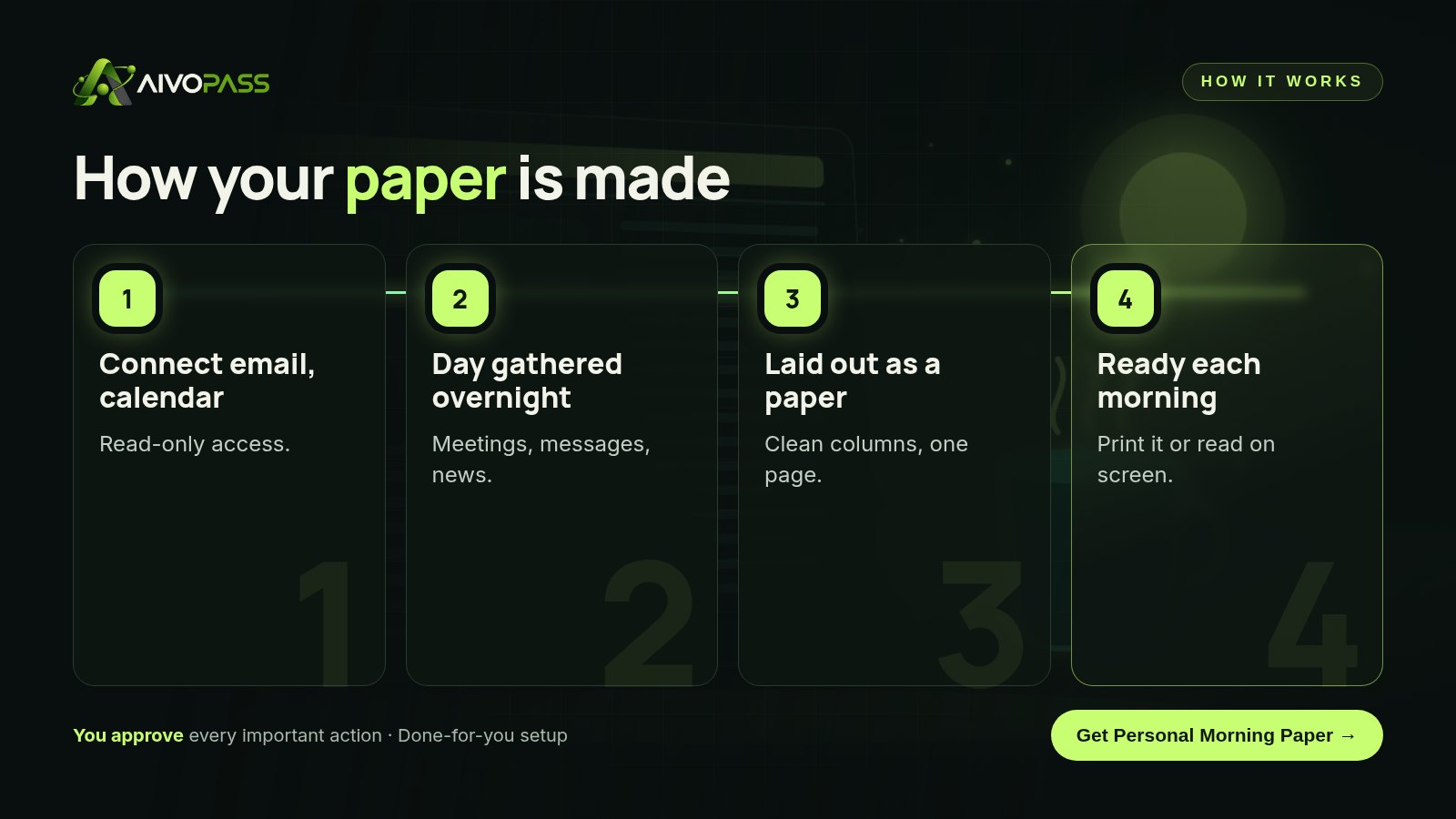
- Choose Personal Morning Paper and check out securely.
- Tell us your sections, news topics and delivery time.
- We connect your email and calendar read-only and test a few editions with you.
- Go live: a fresh one-page paper every morning.
Related agents
Run the family calendar, get a social media digest or stay on track with training. Browse all personal AI agents or read more personal productivity guides.
The bottom line
How you start the morning shapes the rest of the day. A personalized morning newspaper gives you the full picture before the noise begins: meetings, key messages and a little news on one page. With Personal Morning Paper, that page is waiting for you every day, so you can begin with focus instead of a flood of notifications.
Get Personal Morning Paper Calendar and key emails · One page · Read-only
Frequently asked questions
What is a personalized morning newspaper?
It is a one-page daily summary of your own day, designed like a newspaper. Personal Morning Paper combines your meetings, important emails and chosen news into a layout you can print or read.
Can it send emails or change my calendar?
No. It reads your email and calendar to build the page, and it never sends, deletes or accepts anything. You decide what to do with each item.
How long does setup take?
Usually a few business days. We connect your email and calendar with read-only access, agree on sections and news topics, and test a few editions with you.
Can I get it in French?
Yes. The page can be produced in English or French, and we can include Canadian news sources you prefer.
Who is it for?
Executives, professionals and families who want a calm start to the day and less time on screens before breakfast.
See Personal Morning Paper in action.
Creates a personal newspaper from your email and calendar — today’s meetings, important messages and news — laid out nicely and ready to print or read each morning.
We are the people who set up, connect and support AivoPass agents for businesses across Canada and beyond. Every guide is written from real setup work, reviewed by our specialists and updated when an agent changes.
- ✓ Done-for-you setup
- ✓ You approve every important action
- ✓ Secure PayPal checkout
- ✓ Built for Canadian businesses